Fluent: AI Automation for Epicor ERP Systems
How AI agents extend Epicor ERP, and where Fluent fits: it reads business documents, checks them against Epicor and drafts each transaction for a person to approve.

Gonzalo Nuñez
Chief Technology Officer
AI automation for Epicor ERP represents a shift in how organizations extract value from their enterprise systems. For companies operating on Epicor ERP or evaluating Epicor Kinetic, the focus is no longer limited to managing transactions. The focus is increasingly on executing operations intelligently and at scale.
Traditional ERP systems centralize data and enforce process consistency. They are highly effective at recording what has happened. However, they are not designed to continuously interpret data, anticipate outcomes, or act without user input.
AI automation introduces a complementary layer that changes this dynamic. It enables ERP environments to move from passive systems of record to active systems that support, guide, and in certain cases execute operational decisions.
This is already happening in organizations that have connected Epicor with automation platforms that orchestrate workflows, synchronize data, and embed AI into everyday operations.
AI in Epicor ERP Explained
Understanding AI in ERP requires separating concepts that are often grouped together.
Automation is the execution of predefined rules. It is deterministic and consistent. Examples include routing invoices, syncing records between systems, or triggering notifications based on events.
Artificial intelligence introduces pattern recognition and prediction. It analyzes historical and real-time data to generate insights such as demand forecasts, anomaly detection, or financial projections.
Agentic systems combine both elements. They interpret data, make decisions based on defined logic, and execute workflows without requiring manual initiation. AI agents for Epicor Kinetic operate in this space, continuously monitoring data and initiating actions when conditions are met.
The distinction is important. Automation improves efficiency. AI improves decision quality. Agentic systems connect both into operational execution.
Evolution of Epicor: ERP to Kinetic to AI-Augmented Systems
Epicor ERP systems were designed to provide structure across finance, supply chain, and manufacturing operations. These systems introduced consistency and visibility but relied heavily on human coordination.
Epicor Kinetic modernized this foundation through cloud architecture, improved interfaces, and enhanced data access. It allows organizations to operate with greater speed and flexibility while maintaining control over core processes.
However, the introduction of AI automation does not replace Kinetic. It extends it.
Modern ERP environments are evolving into layered systems in which Epicor manages transactions, while external platforms introduce intelligence and execution. This layered model allows organizations to adopt AI-driven ERP workflows without disrupting the stability of their ERP system.
Architecture of AI-Driven ERP Systems
AI-driven ERP environments operate across four interconnected layers.
The ERP layer remains the system of record. It manages financial transactions, inventory positions, and production data with precision and consistency.
The integration layer ensures that data flows between systems. ERP, CRM, and external data sources must remain synchronized to create a unified operational view.
The AI layer processes this data. It generates forecasts, identifies anomalies, and uncovers patterns that would not be visible through manual analysis.
The execution layer is where value is realized. Insights are translated into actions through automated workflows, triggered processes, and system updates.
The effectiveness of AI automation for Epicor ERP depends on how well these layers are connected. Without execution, AI remains theoretical. Without integration, AI lacks context.
Use Cases Across the Enterprise
AI-driven ERP workflows impact multiple areas of the business, often simultaneously.
In supply chain operations, AI enables demand sensing that adjusts forecasts based on real-time signals. Procurement decisions become more responsive, and supplier performance can be evaluated continuously.
Inventory management benefits from predictive optimization. Stock levels can be aligned with actual demand patterns, reducing excess inventory while maintaining service levels.
In finance, automation and AI work together to accelerate processes and improve accuracy. Invoice handling, reconciliation, and forecasting become faster and more reliable.
Manufacturing operations gain visibility into production constraints. Scheduling can be adjusted dynamically, and resources can be allocated more efficiently.
Predictive maintenance allows organizations to anticipate equipment failures before they occur. Maintenance activities become planned rather than reactive, reducing downtime.
Compliance processes can also be embedded into workflows, ensuring that transactions and records align with regulatory and internal requirements without relying on manual verification.
AI use cases by business function
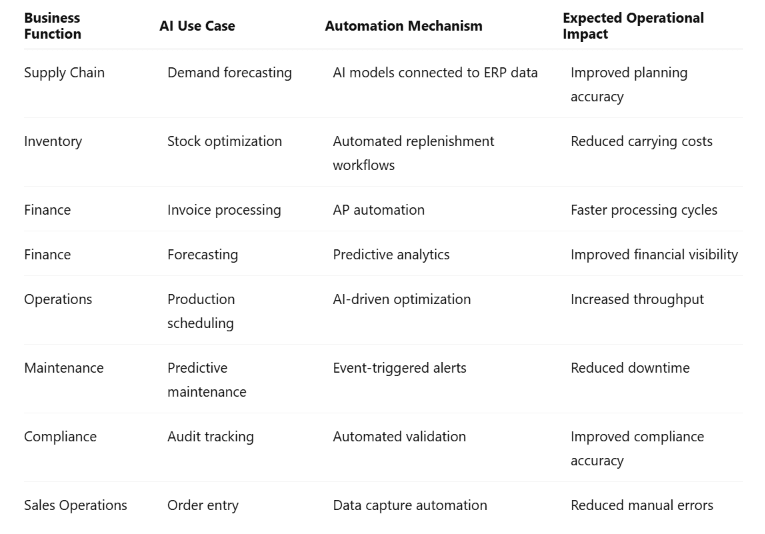
These are industry examples of AI in ERP. They describe what the technology can do across a manufacturer, and they are not a list of Fluent features. The section below covers what Fluent does.
Where Fluent fits
Fluent, from Technology Coast Partners, applies this model to one specific job: the business documents that reach an Epicor team every day. Supplier invoices, purchase orders, packing slips, customer orders and requests for quote arrive as PDFs, emails, spreadsheets and scans, and someone has to key each one into Epicor.
Fluent connects to Epicor Kinetic from outside, through Epicor's REST API, and installs nothing inside Epicor. Its agents read each document, check it against Epicor (vendors, customers, part numbers, purchase order releases and prices) and draft the transaction for the screen it belongs to, such as AP Invoice Entry, Receipt Entry or Order Entry.
A person reviews and approves every draft in Fluent before anything is written to Epicor. The draft waits in Fluent's review queue with anything that needs attention flagged, and only after approval does Fluent write it to Epicor, where Epicor's own business rules apply. Across paying customers over 90 days, 97%+ of extracted fields were approved without a change, and the median review took 55 seconds per document.
Fluent also works with Epicor Prophet 21 and Epicor ECM, and keeps SugarCRM in step with Epicor Kinetic. Other ERPs are connected by our engineers during onboarding, typically in one to two days. Plans start at $600 a month, with a 30-day trial. See how Fluent works with Epicor.
Implementation Considerations
Implementing AI automation requires alignment across data, systems, and people.
Data quality is a prerequisite. Inconsistent or incomplete data reduces the effectiveness of both AI models and automation workflows. Establishing governance and maintaining structured data is essential.
Integration must be approached deliberately. Systems need to communicate reliably, and data synchronization must be designed to support real-time operations rather than periodic updates.
Change management plays a significant role. Automation alters how work is performed. Teams must understand how processes evolve and how their roles adapt within a more automated environment.
Governance ensures that automation remains controlled and auditable. As workflows become more autonomous, organizations must maintain visibility into how decisions are made and executed.
Common Challenges and Misconceptions
A common misconception is that AI can replace all operational decision-making. In reality, AI enhances decisions but operates within defined parameters.
Data fragmentation is another challenge. When systems are not connected, automation cannot function effectively. Integration is not optional. It is foundational.
There is also a tendency to automate without redesigning processes. Automation amplifies existing workflows. If those workflows are inefficient, the result is limited improvement.
Adoption barriers often stem from uncertainty. Teams need clarity on how automation supports their work rather than replaces it. Without this understanding, resistance can slow progress.
Practical Guidance for Implementation:
Organizations should approach AI automation for Epicor ERP in a structured and pragmatic way:
- Start with processes that are repetitive and measurable. Invoice handling, order entry, and data synchronization are strong initial candidates because improvements are visible and quantifiable.
- Implement incrementally. Pilot initiatives allow organizations to validate assumptions and refine workflows before expanding automation across the enterprise.
- Prioritize connectivity. Ensuring that systems are integrated and data flows reliably is more important than introducing complex AI models early.
- Focus on execution. AI insights only create value when they trigger actions. Connecting analytics to workflows should be a primary objective.
- Maintain oversight. Automation should be monitored continuously to ensure accuracy, compliance, and alignment with business objectives.
Future Outlook: AI Agents and Agentic ERP
ERP systems are moving toward environments where workflows are increasingly autonomous.
AI agents for Epicor Kinetic will continuously monitor operational data, identify deviations, and initiate corrective actions. These agents will operate within defined boundaries but with increasing independence.
AI agentic platforms for Epicor Kinetic will further integrate decision-making and execution. Instead of responding to individual events, systems will manage entire processes based on desired outcomes.
ERP environments will become more data-driven, combining internal and external data to support real-time optimization across functions.
The progression is clear. ERP systems are evolving from systems that record activity to systems that actively shape it.
AI automation for Epicor ERP is a key part of this shift. It enables organizations to move beyond efficiency gains toward a model in which operations are continuously optimized through connected data, intelligent analysis, and coordinated execution.
Frequently Asked Questions
Fluent connects to Epicor Kinetic from outside, through Epicor's REST API, on-premise or Epicor-hosted, and installs nothing inside Epicor. It reads Epicor data to check each document, and writes a transaction only after a person approves it in Fluent. Epicor's own business rules validate every write. Setup is one 30-minute technical meeting, after which Fluent is connected; a second session trains your users.
The return on investment (ROI) from AI automation in ERP systems is driven by both cost savings and performance improvements. Organizations typically experience reduced labor costs due to automation of manual tasks, faster processing cycles, and fewer errors requiring correction. Additionally, improved data accuracy and real-time insights lead to better decision-making, increased productivity, and enhanced customer satisfaction. Over time, these gains compound, allowing businesses to scale efficiently while maintaining operational control and competitiveness.
AI enhances ERP efficiency by automating repetitive tasks, accelerating data processing, and enabling real-time decision support. Unlike traditional automation, AI can interpret unstructured data (such as PDFs or emails), identify patterns, and make context-aware decisions. This reduces bottlenecks caused by manual input and approval delays. Additionally, AI-driven workflows can operate continuously, ensuring faster turnaround times and improved process consistency. Over time, the system becomes more accurate and efficient as it learns from historical data and user behavior.
Yes. Fluent's sync jobs keep SugarCRM in step with Epicor Kinetic, so accounts, contacts and order data match in both systems. Our team configures which records and fields move and in which direction, and every run is logged so an operator can see what changed.
Less keying and fewer lookups: Fluent's agents read the document, find the vendor, customer, parts and purchase order lines in Epicor, and hand the reviewer a complete draft. Across paying customers over 90 days, 97%+ of extracted fields were approved without a change and the median review took 55 seconds per document. Control stays with your team, because a person approves every transaction in Fluent before it is written to Epicor, and every decision is in the audit log. Plans start at $600 a month, with a 30-day trial.
It is the use of AI, such as document reading and language models, to take over the repetitive work around Epicor: reading supplier invoices, customer orders and other documents, checking them against Epicor data, and preparing the transaction. Fluent, from Technology Coast Partners, does this with AI agents that draft each Epicor transaction in Fluent. A person reviews and approves it there before anything is written to Epicor, so the team keeps control while the keying and lookups are done for them.
The best candidates are repetitive, document-driven processes: supplier invoices, purchase orders, receipts against packing slips, customer orders, quotes, time entry and cash receipts. Fluent's agents read these documents, check them against Epicor and draft the transaction for the right screen, and a person approves each one in Fluent before it is written to Epicor. Fluent can also keep data in step between Epicor Kinetic and SugarCRM, and answer questions about your Epicor data in plain language.
Fluent lets you ask questions about your Epicor and CRM data in plain language and answers from the rows themselves, with the query behind every number available to read. Answers you want to keep become dashboards, and alerts can tell the right people when a figure crosses a threshold you set.
Yes. Fluent is built for manufacturers and distributors on Epicor Kinetic. Its agents handle the documents that arrive every day (supplier invoices, purchase orders, packing slips, customer orders and quotes) and draft the transaction for the matching Kinetic screen, such as AP Invoice Entry, Receipt Entry or Order Entry. A person approves each one in Fluent before it is written to Epicor. Fluent also works with Epicor Prophet 21, and our engineers connect other ERPs during onboarding, typically in one to two days.
An AI agent reads each invoice, whether it arrives as a PDF, a scan or an electronic file, and extracts the vendor, invoice number, lines and totals. It then checks them against Epicor: the vendor, the purchase order and receipt lines it should match, prices and quantities. With Fluent, the result is a draft in Fluent's review queue with anything that needs attention flagged. A person approves it in Fluent, and only then is the invoice written to AP Invoice Entry in Epicor. Across paying customers over 90 days, the median review took 55 seconds per document.